วันอังคารที่ 21 มิถุนายน พ.ศ. 2559

Java Spring Framework : J2EE Development

-Spring 3.x.x และ 4.x.x MVC Framework
http://crunchify.com/spring-mvc-introduction-to-spring-3-mvc-framework/

-การใช้ Bean ใน Spring Application
http://crunchify.com/spring-mvc-how-to-declare-a-bean-in-spring-application/

-วิธีใช้ AJAX, jQuery ใน Spring Web MVC (.jsp)
http://crunchify.com/how-to-use-ajax-jquery-in-spring-web-mvc-jsp-example/

-การอัพเดต Sparkline Graph ทุกๆ 3 วินาทีใน Spring MVC (Realtime Update)
http://crunchify.com/how-to-update-sparkline-graph-every-3-seconds-in-spring-mvc-realtime-update/

-Spring MVC Project
http://crunchify.com/working-on-spring-mvc-project-how-to-report-list-of-all-loaded-spring-beans-during-startup/

-Spring MVC 4.1.X (การรับส่ง Email ด้วย org.springframework.mail. javamail.JavaMailSenderImpl)
http://crunchify.com/spring-mvc-4-1-x-simple-way-to-send-an-email-using-org-springframework-mail-javamail-javamailsenderimpl/

-Spring Framework 4.2.3 @Order Annotation (การจัดเรียงลำดับด้วย Annotated Bean Component)
http://crunchify.com/spring-framework-4-order-annotation-tutorial-sort-order-for-an-annotated-component/

Java String Collection : J2EE Development


-การใช้ StringTokenizer และ String Split
http://crunchify.com/java-stringtokenizer-and-string-split-example/

-การแปลงจาก HashMap ไปสู่ ArrayList ใน Java
http://crunchify.com/how-to-convert-hashmap-to-arraylist-in-java/

-การสร้าง Java eNum
http://crunchify.com/why-and-for-what-should-i-use-enum-java-enum-examples/

-การแปลง Byte[] Array ไปเป็น String
http://crunchify.com/java-how-to-convert-byte-array-to-string/

-การแปลง Char Array ไปเป็น String
http://crunchify.com/java-two-ways-to-convert-char-array-to-string/

-การแปลง String ไปเป็น Char Array
http://crunchify.com/java-simple-way-to-convert-string-to-char-array/

-การหา Unique Values ใน ArrayList โดยใช้ TreeSet, HashSet
http://crunchify.com/java-how-to-find-unique-values-in-arraylist-using-treeset-hashset/

-การ Reverse String ใน Java
http://crunchify.com/how-to-reverse-a-string-in-java/

-การหา Elements ที่เหมือนกันใน UnSorted Array
http://crunchify.com/how-to-find-common-elements-of-two-unsorted-array/

-การ Replace/Remove Characters จาก String
http://crunchify.com/java-program-to-replaceremove-characters-from-string/

-การ Duplicate Elements จาก List
http://crunchify.com/java-how-to-find-duplicate-elements-from-list/

-การตรวจสอบ String ด้วยการ Substring
http://crunchify.com/java-how-to-check-if-a-string-contains-a-substring-implement-your-own-method/

-การรวมกันทั้ง 2 Arrays โดยใช้ Primitive Data Types (โดยไม่ใช้ Java Collection)
http://crunchify.com/java-union-of-two-arrays-using-primitive-data-types-dont-use-java-collection/

-การรวมกันทั้ง 2 Arrays โดยใช้ Java Collection Class
http://crunchify.com/java-union-of-two-arrays-using-java-collection-class/

-การแปลง Arrays ไปเป็น Set
http://crunchify.com/java-collection-how-to-convert-arrays-to-set/

-การ Swap สมาชิกด้วยวิธีที่นอกเหนือจากการใช้ Temp Variable
http://crunchify.com/java-how-to-swap-two-members-without-using-temp-variable/

-การหา Permutations ของ String
http://crunchify.com/how-to-find-all-permutations-of-a-string-in-java-example/

-การเปรียบเทียบ Arrays โดยใช้ Equal
http://crunchify.com/best-way-to-compare-if-two-arrays-are-equal/

-การกำหนด Non-Empty String Like -Code- Return a String Like -CCoCodCode-
http://crunchify.com/java-given-a-non-empty-string-like-code-return-a-string-like-ccocodcode/

-รู้จักกับ Java Static Methods, Variables, Static Block and Class with Example
http://crunchify.com/java-static-methods-variables-static-block-and-class-with-example/

-การหา Duplicate Character จาก String ใน Java
http://crunchify.com/best-way-to-find-duplicate-character-from-a-string-in-java/

-การใช้ CopyOnWriteArrayList กับ ArrayList ใน Java
http://crunchify.com/copyonwritearraylist-vs-arraylist-in-java-comparison-and-example/

-ArrayBlockingQueue กับ Google Guava Non-Blocking EvictingQueue
http://crunchify.com/arrayblockingqueue-vs-google-guava-non-blocking-evictingqueue-example/

-การเปรียบเทียบ String Arrays, Integer Arrays และ Strings ใน Java
http://crunchify.com/best-way-to-compare-string-arrays-int-arrays-and-strings-in-java-crunchifycompare-utility-for-your-project/

-การเปรียบเทียบ Java eNum Comparison ด้วย Equals (==) operator, Switch-Case statement และ .equals() method)
http://crunchify.com/java-enum-comparison-using-equals-operator-switch-case-statement-and-equals-method-complete-example/

Java Thread : J2EE Development


-Thread-Safe และ Fast Singleton Implementation (Singleton Design Pattern ใน java)
http://crunchify.com/thread-safe-and-a-fast-singleton-implementation-in-java/

-อะไร คือ Daemon Thread ใน Java
http://crunchify.com/what-is-daemon-thread-in-java-example-attached/

-Process ID และ Live Threads ของ Java Application
http://crunchify.com/how-to-get-process-id-and-live-threads-of-a-java-application/

-การทดสอบหลาย Threads ใน Java
http://crunchify.com/how-to-run-multiple-threads-concurrently-in-java-executorservice-approach/

-การ Start/Spawn เพื่อสร้าง Thread ใน Background ของ Java
http://crunchify.com/how-to-startspawn-new-thread-in-background-in-java/

-การสร้าง Java Deadlock Programmatically และการวิเคราะห์ Deadlock
http://crunchify.com/how-to-generate-java-deadlock-programmatically-and-how-to-analyze-deadlock/

-การสร้าง Java Thread Dump Programmatically
http://crunchify.com/how-to-generate-java-thread-dump-programmatically/

-Exception ใน thread main (java.lang.CloneNotSupportedException)
http://crunchify.com/how-to-avoid-exception-in-thread-main-java-lang-clonenotsupportedexception/

-การสร้าง Lazy Singleton ThreadSafe นอกเหนือจาก Synchronized Keyword
http://crunchify.com/lazy-creation-of-singleton-threadsafe-instance-without-using-synchronized-keyword/

-การปรับปรุง Simple Threadsafe Cache ด้วย HashMap นอกเหนือจากการใช้ Synchronized Collection
http://crunchify.com/implement-simple-threadsafe-cache-using-hashmap-without-using-synchronized-collection/

-เงื่อนไขที่มีผลใน Java Multi-threading Concurrency
http://crunchify.com/have-you-noticed-race-condition-in-java-multithreading-concurrency-example-how-to-deal-with-it/

-Threadsafe BlockingQueue ใน Java
http://crunchify.com/what-is-threadsafe-blockingqueue-in-java-and-when-you-should-use-it-implementation-attached/

-ตัวอย่าง Simple Thread
http://crunchify.com/java-simple-thread-example/

-ตัวอย่าง Thread State
http://crunchify.com/java-thread-state-introduction-with-example/

-การสร้าง Timer Object สำหรับ Execution ภายใน Background Thread (Timer.schedule())
http://crunchify.com/java-create-a-timer-object-for-future-execution-in-a-background-thread/

-อะไร คือ Java Semaphore และ Mutex (Java Concurrency MultiThread)
http://crunchify.com/what-is-java-semaphore-and-mutex-java-concurrency-multithread-explained-with-example/

Java Framework : J2EE Development


Top 10 Java Interview Questions 
http://crunchify.com/top-10-java-interview-questions-answers-must-read-before-appearing-for-any-java-interview/

Java Annotations 
-ทำความเข้าใจกับ Java Annotations
http://crunchify.com/understanding-java-annotation-annotation-examples/

Java Calendar
-การเพิ่มนาทีที่ Calendar Object
http://crunchify.com/java-how-to-add-n-minutes-to-calendar-data-object/

Java Cookies
-การจัดการ Java Servlet Session ด้วย Cookies
http://crunchify.com/how-to-do-java-servlet-session-management-using-cookies/

Java Date
-การคำนวณเวลาด้วย Java Date
http://crunchify.com/how-to-calculate-the-difference-between-two-java-date-instances/

Java Mail
-การส่ง Email ด้วย Java MailAPI กับวิธีการเพิ่มไฟล์รูปขนาดใหญ่เพื่อส่ง E-mail
http://crunchify.com/how-send-email-using-java-mailapi-with-large-image-attachment/

-ตัวอย่าง Java MailAPI (การส่ง Email ด้วย GMail SMTP (TLS Authentication))
http://crunchify.com/java-mailapi-example-send-an-email-via-gmail-smtp/

-การสร้าง Validate Email Address ด้วย Java Mail API
http://crunchify.com/how-to-validate-email-address-using-java-mail-api/

Java Exception
-การเกิด Exception ใน thread “main” java.lang.UnsupportedClassVersionError: (com/crunchify/Main : Unsupported major.minor version 51.0)
http://crunchify.com/exception-in-thread-main-java-lang-unsupportedclassversionerror-comcrunchifymain-unsupported-major-minor-version-51-0/

-การกำหนดวิธีตรวจสอบและไม่ตรวจสอบ Exceptions
http://crunchify.com/better-understanding-on-checked-vs-unchecked-exceptions-how-to-handle-exception-better-way-in-java/

-java.lang.UnsatisfiedLinkError
http://crunchify.com/how-to-fix-java-lang-unsatisfiedlinkerror-no-snappyjava-in-java-library-path-error/

Java Hibernate
-พื้นฐานการใช้ Hibernate
http://crunchify.com/lessons-to-learn-fundamental-of-hibernate-core-implementation/

Java Interface
-วิธีใช้งาน Java Interface
http://crunchify.com/what-is-an-interface-in-java-how-its-used-java-tutorial-example-attached/

Java IO
-วิธีการบันทึกและโหลดข้อมูลจากไฟล์ (I/O Read-Write Operation)
http://crunchify.com/java-saving-and-loading-data-from-a-file-simple-production-ready-utility-for-file-readwrite-operation/

-Java NIO (Non-blocking I/O) กับตัวอย่างการใช้งานระหว่าง Server-Client (java.nio.ByteBuffer และ channels.Selector : Java NIO Vs. IO)
http://crunchify.com/java-nio-non-blocking-io-with-server-client-example-java-nio-bytebuffer-and-channels-selector-java-nio-vs-io/

Java Iterate Loop
-5 วิธีที่จะ Iterate Through Loop ใน Java
http://crunchify.com/how-to-iterate-through-java-list-4-way-to-iterate-through-loop/

-พื้นฐาน Java Iterator, ListIterator และ ConcurrentModificationException
http://crunchify.com/java-iterator-listiterator-fundamentals-concurrentmodificationexception/

Java JDBC
-ความแตกต่าง ระหว่าง JDBC’s Statement, PreparedStatement และ CallableStatement
http://crunchify.com/what-are-the-difference-between-jdbcs-statement-preparedstatement-and-callablestatement/

-การเชื่อมต่อ JDBC กับ MySQL ด้วย BasicDataSource
http://crunchify.com/java-what-is-basicdatasource-how-to-create-basicdatasource-object/

-การเชื่อมต่อ JDBC กับ Oracle Database และตัวอย่างการ ExecuteQuery ใน Java
http://crunchify.com/simple-oracle-database-jdbc-connect-and-executequery-example-in-java/

Java Jar File
http://crunchify.com/in-java-how-to-find-list-of-all-class-names-from-inside-jar-file-jar-class-finder-utility/

Java JUnit
-การใช้ JUnit 4.x
http://crunchify.com/simple-junit-4-tutorial-hello-world-example/

Java 8 Stream API Operations and Lambda Expression
http://crunchify.com/java-8-stream-operations-and-lambda-expression-tutorial/

Java Log4j
-การ configure log4j.properties และตัวอย่างการใช้งาน Program
http://crunchify.com/java-how-to-configure-log4j-logger-property-correctly/

-การกำหนด Logging Level ใน Log4j (Configuring Log4j)
http://crunchify.com/java-how-to-create-your-own-logging-level-in-log4j-configuring-log4j/

-การสร้าง Logging สำหรับ Enterprise Java Application
http://crunchify.com/better-logging-for-your-enterprise-java-application-crunchifybetterlog4jlogging-java/

-การแสดง ERROR StatusLogger No log4j2
http://crunchify.com/error-statuslogger-no-log4j2-configuration-file-found-using-default-configuration-logging-only-errors-to-the-console/

-การใช้ Log File Tailer (tail -f) ใน Java
http://crunchify.com/log-file-tailer-tail-f-implementation-in-java-best-way-to-tail-any-file-programmatically/

Java OSGi
-เข้าใจในหลักของ OSGi โดยใช้หลัก Puzzle Approach
http://crunchify.com/understand-osgi-concepts-try-to-follow-the-puzzle-approach/

Java Package
-การ Import Packages
http://crunchify.com/java-simple-way-to-import-all-missing-packages-at-once/

Java Prime Number
-การค้นหา Prime Number ใน Java
http://crunchify.com/in-java-how-to-find-if-number-is-prime-or-not-best-way-to-generate-prime-number-in-java/

Java QR Code
-การสร้าง QR Code Generator
http://crunchify.com/java-simple-qr-code-generator-example/

Java Random
-การ Random Number ในภาษา Java
http://crunchify.com/how-to-generate-random-number-in-java-with-some-variations/

-การ Random Key-Value Element จากการใช้ HashMap
http://crunchify.com/java-how-to-get-random-key-value-element-from-hashmap/

Java Regular Expression
-อะไร คือ RegEx Pattern (Regular Expression)
http://crunchify.com/what-is-regex-pattern-regular-expression-how-to-use-it-in-java-example-attached/

Java Secure
-UUID, UID, SecureRandom หรือ MessageDigest
http://crunchify.com/uuid-uid-random-or-messagedigest-number-of-ways-to-create-unique-idkey-in-java/

Java SVN
-การ Setup WordPress Plugin ใน Eclipse และการใช้งาน SVN สำหรับ WordPress Plugin Development
http://crunchify.com/eclipse-and-wordpress-plugin-svn-repository-connectivity/

Java Timer
-Operation n Number ของ Times
http://crunchify.com/how-to-retry-operation-n-number-of-times-in-java/

-การ Convert Time ระหว่าง Timezone
http://crunchify.com/how-to-convert-time-between-timezone-in-java/

-Java Timer และ TimerTask
http://crunchify.com/java-timer-and-timertask-reminder-class-tutorials-example/

-Java 8 java.time.temporal.TemporalAdjusters และ Stream.flatMap()
http://crunchify.com/java-8-temporaladjusters-and-stream-flatmap-tutorial/

-การลบ Expired Elements จาก HashMap และการเพิ่ม Elements
http://crunchify.com/clean-expired-element-from-map-while-adding-elements-at-the-same-time-java-timer-timertask-and-futures-complete-examples/

Java Transaction
-Lock(), UnLock(), ReentrantLock(), TryLock() และความแตกต่างระหว่าง Synchronized Block ใน Java
http://crunchify.com/what-is-lock-unlock-reentrantlock-trylock-and-how-its-different-from-synchronized-block-in-java/

Java Command
-การแสดง Name Server  Java โดยใช้ Dig command
http://crunchify.com/best-way-to-get-any-domains-zone-records-mx-and-name-server-in-java-using-dig-command/

Java Reflection
-การสร้าง Java POJO ด้วย Reflection API (ClassName, DeclaredFields, ObjectType, SuperType)
http://crunchify.com/create-simple-pojo-and-multiple-java-reflection-examples/

Java XML
-วิธีการนับจำนวน XML Elements ใน Java
http://crunchify.com/simple-way-to-count-number-of-xml-elements-in-java/

-วิธีการเขียน XML (DOM) File ใน Java
http://crunchify.com/java-simple-way-to-write-xml-dom-file-in-java/

-วิธีการใช้งาน XML XPath Parser ทำอย่างไรถึงจะส่งข้อมูล XML โดยใช้ XPath ใน Java
http://crunchify.com/java-xml-xpath-parser-how-to-parse-xml-document-using-xpath-in-java/

Java File
-การ Upload หลาย Files โดยกำหนด Location ใช้งานเฉพาะ
http://crunchify.com/spring-mvc-tutorial-how-to-upload-multiple-files-to-specific-location/

Java Linux
-tcpdump Linux Command ด้วย Java Process Class และ TCP/IP Packets
http://crunchify.com/how-to-execute-tcpdump-linux-command-using-java-process-class-and-capture-tcpip-packets/

-การใช้ Regular Expression (RegEx)
http://crunchify.com/what-is-uptime-in-linux-and-how-to-parse-result-in-java-using-regular-expression-regex/

Java Packages
http://crunchify.com/java-simple-way-to-import-all-missing-packages-at-once/

Java Design Pattern
-Factory Design Method Pattern
http://crunchify.com/java-factory-design-method-pattern-object-oriented-design-design-patterns/

-Singleton Object & Employee (Java POJO & Detailed TestCase)
http://crunchify.com/complete-end-to-end-java-tutorial-with-singleton-object-employee-crunchify-object-pojo-detailed-testcase/

Java Utils
-java.util.concurrent.ExecutionException: org.apache.catalina.LifecycleException?
http://crunchify.com/org-apache-catalina-lifecycleexception/

-fix “org.eclipse.jst.ws.util.JspUtils cannot be resolved to a type” เพื่อแก้ปัญหา Error ใน Eclipse
http://crunchify.com/how-to-fix-org-eclipse-jst-ws-util-jsputils-cannot-be-resolved-to-a-type-error-in-eclipse/

-Java Regex (java.util.regex.Matcher)
http://crunchify.com/java-regular-expression-matcher-all-in-one-tutorial/

-java.util.Map และ java.util.List ใน Java 8
http://crunchify.com/in-java-8-how-to-iterate-through-java-util-map-and-java-util-list-example-attached-with-total-5-different-ways/

Java JSP
-JSP file validation ใน Eclipse
http://crunchify.com/how-to-exclude-jsp-file-validation-in-eclipse/

Java Algorithm : J2EE Development


-การเขียน Bubble Sort Algorithm (Descending Order)
http://crunchify.com/java-bubble-sort-algorithm-descending-order-sample/

-การเขียน Bubble Sort Algorithm (Ascending Order)
http://crunchify.com/java-bubble-sort-algorithm-ascending-order-sample/

-LinkedList Instance ใน Java
http://crunchify.com/how-to-iterate-through-linkedlist-instance-in-java/

-การเขียน Fibonacci Series (N Number)
http://crunchify.com/write-java-program-to-print-fibonacci-series-upto-n-number/

-การหา Middle Element ของ LinkedList
http://crunchify.com/java-how-to-find-middle-element-of-linkedlist/

-LinkedList Class ใน Java
http://crunchify.com/how-to-implement-a-linkedlist-class-from-scratch-in-java/

-ตัวอย่าง Singly Linked List Implementation ใน Java
http://crunchify.com/a-simple-singly-linked-list-implementation-in-java/

-การสร้าง Singleton QUEUE Global Object (FIFO (First in First Out))
http://crunchify.com/how-to-create-singleton-queue-global-object-for-fifo-first-in-first-out-in-java/

-การกำหนด Non-Blocking โดยกำหนด Size Queue ใน Java
http://crunchify.com/how-to-create-your-own-non-blocking-queue-in-java-same-as-evictingqueue/

วันเสาร์ที่ 18 มิถุนายน พ.ศ. 2559

Linux and Unix Command


File/Directory Basics
lsList files
cpCopy files
mvRename files
rmDelete files
lnLink files
cdChange directory
pwdPrint current directory name
mkdirCreate directory
rmdirDelete directory
File Viewing
catView files
lessPage trough files
headView file beginning
tailView files ending
nlNumber lines
odView binary files
xxdView binary files
gvView Postscript/PDF files
xdviView TeX DVI files
File Creation and Editing
emacsText editor
vimText editor
umaskSet default file protections
sofficeEdit Word/Excel/PowerPoint docs
abiwordEdit Word documents
gnumericEdit Excel documents
File Properties
statDisplay file attributes
wcCount bytes/words/lines
duMeasure disk usage
fileIdentify file types
touchChange file timestamps
chownChange file owner
chgrpChange file group
chmodChange file protections
chattrChange advanced file attributes
IsattrList advanced file attributes
File Location
findLocate files
slocateLocate files via index
whichLocate commands
whereisLocate standard files
File Text Manipulation
grepSearch text for matching lines
cutExtract columns
pasteAppend columns
trTranslate characters
sortSort lines
uniqLocate indentical lines
teeCopy stdin to file and to stdout simultaneously
File Compression
gzipCompress files (GNU Zip)
CompressCompress files (Unix)
bzip2Compress files (BZip2)
zipCompress files (Windows Zip)
File Comparison
diffCompare files line by line
commCompare sorted files
cmpCompare files byte by byte
md5sumCompute Checksums
Disks and Filesystems
dfShow free disk space
mountMake a disk accessible
fsckCheck a disk for errors
syncFlush disk caches
Backups and Remote Storage
mtControl a type drive
dumpBack up a disk
restoreRestore a dump
tarRead/write type archives
cdrecordBurn a CD
rsyncMirror a set of files
Printing
lprPrint files
lpqView print queue
lprmRemove print jobs
Spelling Operations
lookLook up spelling
aspellCheck spelling interactively
spellCheck spelling in batch
Processes
psList all processes
wList users' processes
uptimeView the system load
topMonitor processes
xloadMonitor system load
freeDisplay free memory
killTerminate processes
niceSet process priorities
reniceChange process priorities
Scheduling Jobs
sleepWait for some time
watchRun programs at set intervals
atSchedule a job
crontabSchedule repeated jobs
Hosts
unamePrint system information
hostnamePrint the system's hostname
ifconfigSet/display network information
hostLook up DNS
whoisLookup domain registrants
pingCheck if host is reachable
tracerouteView network path to a host
Networking
sshSecurely log into remote hosts
telnetLog into remote hosts
scpSecurely copy files between hosts
stfpSecurely copy files between hosts
ftpCopy files between hosts
evolutionGUI email client
muttText-based email client
mailMinimal email client
mozillaWeb browser
lynxText-only web browser
wgetRetrieve web pages to disk
slrnRead Usenet news
gaimInstant messaging/IRC
talkLinux/Unix chat
writeSend messages to a termainal
mesgProhibit talk/write
Audio and Video
gripPlay CDs and rip MP3s
xmmsPlay audio files
cdparanoiaRip audio
audacityEdit audio
xcdroastBurn CDs

-How to using Terminal?
https://help.ubuntu.com/community/UsingTheTerminal

-How do I open a terminal?
http://askubuntu.com/questions/183775/how-do-i-open-a-terminal

-How do I restart shutdown from a terminal?
http://askubuntu.com/questions/187071/how-do-i-restart-shutdown-from-a-terminal

-How do you open a command line?
http://askubuntu.com/questions/196212/how-do-you-open-a-command-line

-How to setup and use ftp server in ubuntu linux?
https://linuxconfig.org/how-to-setup-and-use-ftp-server-in-ubuntu-linux
https://help.ubuntu.com/lts/serverguide/ftp-server.html
https://th.godaddy.com/help/how-to-set-up-an-ftp-server-on-ubuntu-1404-12301

วันจันทร์ที่ 6 มิถุนายน พ.ศ. 2559

How to Install Linux Server (Ubuntu 16.04 amd 64)

ขั้นตอนการติดตั้ง Linux Server (Ubuntu 16.04 amd 64)

ขั้นตอนแรก....
เข้าไป Download Ubuntu ได้ที่ http://www.ubuntu.com/download/server แล้วจะได้ไฟล์ iso กลับมา


คุณสมบัติของ Linux Ubuntu Server 16.04 LTS มีดังนี้


ส่วนรายละเอียดของ Linux เวอร์ชั่นนี้ ติดตามต่อได้ที่ http://www.ubuntu.com/server

เริ่มขั้นตอนการติดตั้ง....
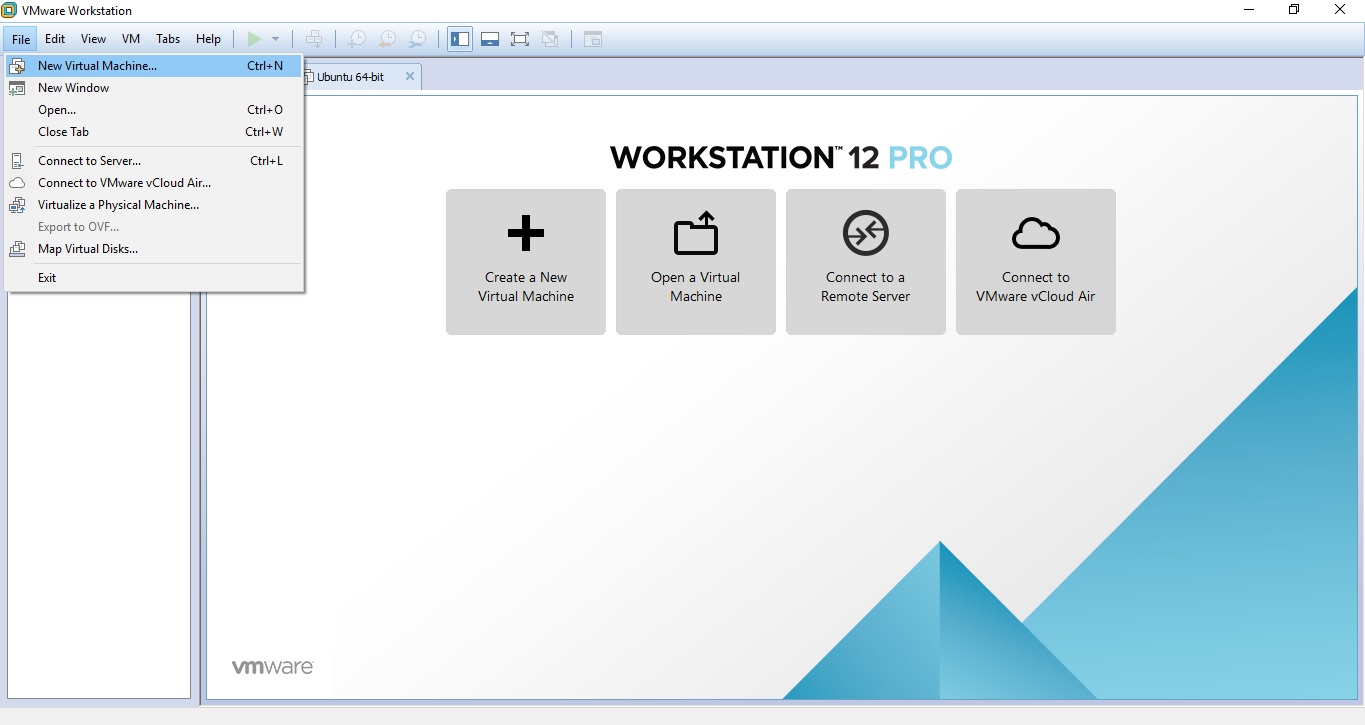
Step 1 : เข้าใช้งาน VMware ด้วยการคลิ๊กที่ Icon โปรแกรม VMware WorkStation
Step 2 : เมื่อเข้าสู่ VMware ให้คลิ๊กเลือกที่ Menu Bar  ของโปรแกรม เลือก File->New Virtual Machine… หรือคลิ๊กที่ Create New Virtual Machine ในหน้า Home


Step 3 : เลือก Typical(recommended) แล้วกด Next


Step 4 : เลือก Install disc image (iso) โดยคลิ๊กปุ่ม Browse ที่ D:\software\Ubuntu (Linux Server 64 Bit)\ubuntu-16.04-server-amd64.iso เพื่อเลือกไฟล์ .iso แล้ว Open


Step 5 : ตั้งชื่อผู้ใช้(Full name) Linux ซึ่งเป็นชื่อเต็มของผู้ใช้ , ชื่อผู้ใช้(User name) ซึ่งเป็นชื่อสำหรับ Login และรหัสผ่านของผู้ใช้(Password)  เมื่อเสร็จแล้วคลิ๊กที่ปุ่ม Next


Step 6 : ตั้งชื่อออปเจ็ค VMware ซึ่งเป็นชื่อ Server จำลอง ที่เราจะใช้งานผ่าน VMware แล้วคลิ๊กที่ปุ่ม Next


Step 7 : กำหนดขนาดพื้นที่การทำงานให้กับ Server เป็น 20 GB หมายความว่าระบบปฏิบัติการจะจองพื้นที่สูงสุดให้กับออปเจ็ค VMware นี้ด้วยขนาดไม่เกิน 20 GB ไม่ใช่กันพื้นที่ไว้ 20 GB ใน Hard disk จริงๆ แต่หมายความว่าใช้ได้ไม่เกินนี้ ซึ่งถ้าเราใช้งาน Server ไม่ถึง 20 GB  พื้นที่ๆเหลือก็จะคืนสู่ OS หลัก เช่น เราใช้ 10 GB ที่เหลืออีก 10 GB ก็จะคืนสู่ OS หลัก แต่ถ้าเราจะใช้ 30 GB ก็จะไม่สามารถใช้ได้ เพราะเรากำหนดไว้แค่ 20 GB


Step 8 : โปรแกรมจะแจ้งรายละเอียดการติดตั้งแก่ผู้ใช้ จากนั้นคลิ๊กที่ปุ่ม Finish


Step 9 : เริ่มเข้าสู่กระบวนการติดตั้ง รอจนกว่าจะติดตั้งเสร็จ


Step 10 : การติดตั้งเสร็จสมบูรณ์ จะเข้าสู่หน้า Login จะมีออปเจ็ค VMware โผล่ขึ้นมาด้านซ้ายมือ ลองเข้าใช้งานโดยการกรอก User name และ Password ที่ได้ตั้งไว้


การติดตั้ง GUI ให้กับ Ubuntu Server

เมื่อติดตั้ง Ubuntu Server แล้ว จะไม่มี GUI ให้เราทำการติดตั้งเองดังต่อไปนี้
1. ให้ทำการ Update และ Upgrade Server เป็นปัจจุบันก่อน 
-การ Update จะใช้คำสั่ง  $ sudo apt-get update  จากนั้นใส่รหัสผ่านลงไป
-การ Upgrade จะใช้คำสั่ง $ sudo apt-get upgrade จากนั้นใส่รหัสผ่านลงไป

2. ติดตั้ง GUI ให้กับ Server โดยติดตั้งแพ็คเกต gnome-core และแพ็คเกต  xorg 
-ขั้นตอนที่ 1 ใช้คำสั่ง  $ sudo apt-get install gnome-core xorg 
-ขั้นตอนที่ 2 พิมพ์ y เพื่อยอมรับเงื่อนไข  จากนั้นรอจนกว่าจะติดตั้งเสร็จ

3. ติดตั้ง Editor เสริม คือ vim editor ไว้สำหรับแก้ไขข้อมูล ซึ่ง vim editor คือ การนำ vi editor มาทำการปรับปรุงให้ดีกว่าเดิม  เช่น การเพิ่มสี  หรือการใส่คำสั่งอื่นๆ เพิ่มเติม เพื่อให้ใช้งานง่ายกว่า vi 
โดยการติดตั้ง ใช้คำสั่ง $ sudo apt-get install vim